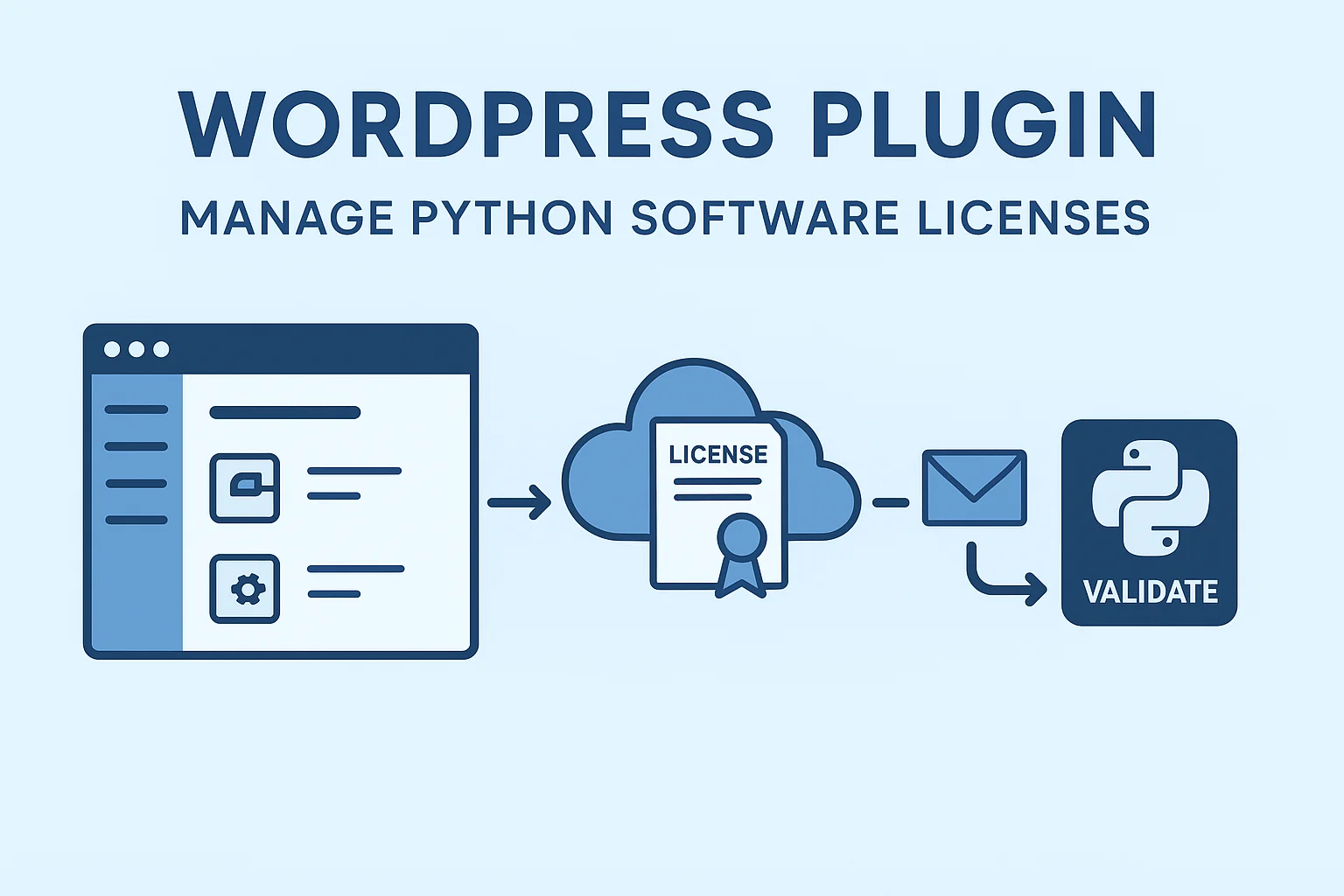
WordPress License Key Plugin: Hướng Dẫn Tích Hợp & Quản Lý Tự Động
📋 Mục Lục
- Yêu Cầu Hệ Thống
- Cấu Trúc Thư Mục Plugin
- Các Bước Cài Đặt
- Cấu Hình Plugin
- Tạo Sản Phẩm Phần Mềm
- Tích Hợp API cho Python
- Tùy Chỉnh Email Template
🔧 Yêu Cầu Hệ Thống
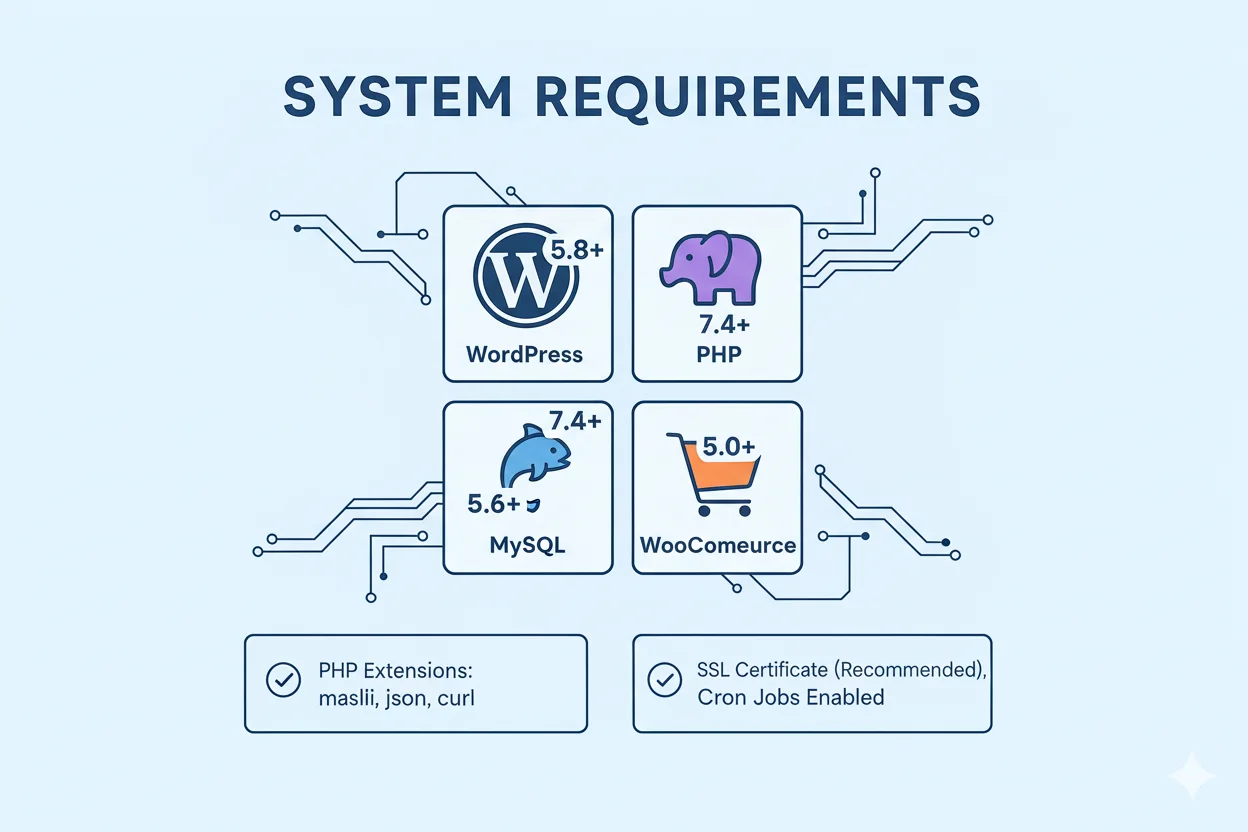
Môi Trường WordPress
- WordPress: 5.8 trở lên
- PHP: 7.4 trở lên
- MySQL: 5.6 trở lên
- WooCommerce: 5.0 trở lên
Server Requirements
- PHP Extensions:
mysqli,json,curl - SSL Certificate (khuyến nghị cho API)
- Cron Jobs enabled
📁 Cấu Trúc Thư Mục Plugin
software-license-manager/
│
├── software-license-manager.php          # File chính
├── readme.txt
├── LICENSE
│
├── includes/                              # Core classes
│   ├── class-slm-database.php            # Quản lý database
│   ├── class-slm-license.php             # Quản lý license
│   ├── class-slm-generator.php           # Sinh license key
│   ├── class-slm-email.php               # Gửi email
│   ├── class-slm-woocommerce.php         # Tích hợp WooCommerce
│   └── class-slm-api.php                 # REST API
│
├── admin/                                 # Admin interface
│   ├── class-slm-admin.php               # Admin menu & pages
│   ├── class-slm-product-settings.php    # Product settings tab
│   ├── class-slm-license-list.php        # License list table
│   └── views/                            # Admin templates
│       ├── dashboard.php
│       ├── licenses-list.php
│       ├── license-detail.php
│       └── settings.php
│
├── frontend/                              # Frontend interface
│   ├── class-slm-my-account.php          # My Account tab
│   └── templates/
│       └── my-licenses.php
│
├── assets/                                # CSS & JS
│   ├── css/
│   │   ├── admin.css
│   │   └── frontend.css
│   └── js/
│       ├── admin.js
│       └── frontend.js
│
├── templates/                             # Email templates
│   └── emails/
│       └── license-key.php
│
└── languages/                             # Translations
    └── software-license-manager.pot
🚀 Các Bước Cài Đặt

Bước 1: Tạo Cấu Trúc Thư Mục
- Kết nối FTP/SSH đến server WordPress của bạn
- Điều hướng đến thư mục:
/wp-content/plugins/ - Tạo thư mục mới:
software-license-manager
cd /wp-content/plugins/
mkdir software-license-manager
cd software-license-manager
Bước 2: Upload Files Plugin
Tạo thư mục con:
mkdir includes admin frontend assets templates languages
mkdir assets/css assets/js
mkdir admin/views
mkdir frontend/templates
mkdir templates/emails
Copy các file đã tạo vào đúng vị trí:
software-license-manager.php→ thư mục gốc- Các file
class-*.php→ thư mụcincludes/ - Admin files → thư mục
admin/ - Frontend files → thư mục
frontend/
Bước 3: Tạo File Generator Class
Tạo file includes/class-slm-generator.php:
<?php
class SLM_Generator {

    private static $instance = null;

    public static function instance() {
        if (is_null(self::$instance)) {
            self::$instance = new self();
        }
        return self::$instance;
    }

    /**
     * Generate license key
     */
    public static function generate_key() {
        $format = get_option('slm_license_key_format', 'XXXX-XXXX-XXXX-XXXX-XXXX');
        $chars = 'ABCDEFGHJKLMNPQRSTUVWXYZ23456789'; // Bỏ các ký tự dễ nhầm

        $key = '';
        $format_parts = explode('-', $format);

        foreach ($format_parts as $part) {
            $length = strlen($part);
            for ($i = 0; $i < $length; $i++) {
                $key .= $chars[random_int(0, strlen($chars) - 1)];
            }
            $key .= '-';
        }

        return rtrim($key, '-');
    }

    /**
     * Generate batch keys
     */
    public static function generate_batch($count = 10, $product_id = 0) {
        $keys = array();

        for ($i = 0; $i < $count; $i++) {
            $key = self::generate_key();

            // Kiểm tra trùng
            while (SLM_Database::get_license_by_key($key)) {
                $key = self::generate_key();
            }

            $keys[] = $key;
        }

        return $keys;
    }
}
Bước 4: Tạo File WooCommerce Integration
Tạo file includes/class-slm-woocommerce.php:
<?php
class SLM_WooCommerce {

    private static $instance = null;

    public static function instance() {
        if (is_null(self::$instance)) {
            self::$instance = new self();
        }
        return self::$instance;
    }

    private function __construct() {
        // Hook vào order completed
        add_action('woocommerce_order_status_completed', array($this, 'generate_licenses_for_order'), 10, 1);

        // Thêm license info vào order details
        add_action('woocommerce_order_details_after_order_table', array($this, 'show_licenses_in_order'), 10, 1);
    }

    /**
     * Sinh license khi order completed
     */
    public function generate_licenses_for_order($order_id) {
        $order = wc_get_order($order_id);

        if (!$order) {
            return;
        }

        // Kiểm tra đã sinh license chưa
        $existing_licenses = SLM_Database::get_licenses_by_order($order_id);
        if (!empty($existing_licenses)) {
            return; // Đã sinh rồi
        }

        $customer_email = $order->get_billing_email();
        $items = $order->get_items();

        foreach ($items as $item) {
            $product_id = $item->get_product_id();
            $quantity = $item->get_quantity();

            // Kiểm tra sản phẩm có enable license không
            $enable_license = get_post_meta($product_id, '_slm_enable_license', true);

            if ($enable_license === 'yes') {
                // Sinh license cho mỗi quantity
                for ($i = 0; $i < $quantity; $i++) {
                    $license_id = SLM_License::instance()->create_license(
                        $order_id,
                        $product_id,
                        $customer_email
                    );

                    if ($license_id) {
                        error_log("License created: ID $license_id for Order $order_id");
                    }
                }
            }
        }

        // Gửi email
        $licenses = SLM_Database::get_licenses_by_order($order_id);
        if (!empty($licenses)) {
            SLM_Email::instance()->send_license_email($order, $licenses);
        }
    }

    /**
     * Hiển thị licenses trong order details
     */
    public function show_licenses_in_order($order) {
        $licenses = SLM_Database::get_licenses_by_order($order->get_id());

        if (empty($licenses)) {
            return;
        }

        ?>
        <section class="woocommerce-licenses">
            <h2><?php _e('License Keys', 'software-license-manager'); ?></h2>
            <table class="woocommerce-table shop_table">
                <thead>
                    <tr>
                        <th><?php _e('Product', 'software-license-manager'); ?></th>
                        <th><?php _e('License Key', 'software-license-manager'); ?></th>
                        <th><?php _e('Status', 'software-license-manager'); ?></th>
                        <th><?php _e('Expires', 'software-license-manager'); ?></th>
                    </tr>
                </thead>
                <tbody>
                    <?php foreach ($licenses as $license):
                        $product = wc_get_product($license->product_id);
                    ?>
                    <tr>
                        <td><?php echo esc_html($product->get_name()); ?></td>
                        <td><code><?php echo esc_html($license->license_key); ?></code></td>
                        <td><span class="slm-status status-<?php echo esc_attr($license->status); ?>">
                            <?php echo esc_html(ucfirst($license->status)); ?>
                        </span></td>
                        <td><?php echo $license->expires_at ? date_i18n(get_option('date_format'), strtotime($license->expires_at)) : __('Lifetime', 'software-license-manager'); ?></td>
                    </tr>
                    <?php endforeach; ?>
                </tbody>
            </table>
        </section>
        <?php
    }
}
Bước 5: Tạo File Email Handler
Tạo file includes/class-slm-email.php:
<?php
class SLM_Email {

    private static $instance = null;

    public static function instance() {
        if (is_null(self::$instance)) {
            self::$instance = new self();
        }
        return self::$instance;
    }

    /**
     * Gửi email license key
     */
    public function send_license_email($order, $licenses) {
        if (get_option('slm_enable_email') !== 'yes') {
            return;
        }

        $to = $order->get_billing_email();
        $subject = $this->get_email_subject($order);
        $message = $this->get_email_content($order, $licenses);
        $headers = $this->get_email_headers();

        wp_mail($to, $subject, $message, $headers);

        do_action('slm_license_email_sent', $order, $licenses);
    }

    /**
     * Get email subject
     */
    private function get_email_subject($order) {
        $subject = get_option('slm_email_subject', 'Your Software License Keys');

        // Replace placeholders
        $subject = str_replace('{order_number}', $order->get_order_number(), $subject);
        $subject = str_replace('{site_name}', get_bloginfo('name'), $subject);

        return $subject;
    }

    /**
     * Get email content
     */
    private function get_email_content($order, $licenses) {
        ob_start();

        $template = SLM_PLUGIN_DIR . 'templates/emails/license-key.php';

        if (file_exists($template)) {
            include $template;
        } else {
            // Default template
            $this->default_email_template($order, $licenses);
        }

        return ob_get_clean();
    }

    /**
     * Default email template
     */
    private function default_email_template($order, $licenses) {
        ?>
        <div style="font-family: Arial, sans-serif; max-width: 600px; margin: 0 auto;">
            <h2 style="color: #333;">Cảm ơn bạn đã mua hàng!</h2>

            <p>Xin chào <?php echo esc_html($order->get_billing_first_name()); ?>,</p>

            <p>Dưới đây là license key(s) cho đơn hàng #<?php echo $order->get_order_number(); ?>:</p>

            <table style="width: 100%; border-collapse: collapse; margin: 20px 0;">
                <thead>
                    <tr style="background: #f5f5f5;">
                        <th style="padding: 10px; text-align: left; border: 1px solid #ddd;">Sản phẩm</th>
                        <th style="padding: 10px; text-align: left; border: 1px solid #ddd;">License Key</th>
                    </tr>
                </thead>
                <tbody>
                    <?php foreach ($licenses as $license):
                        $product = wc_get_product($license->product_id);
                    ?>
                    <tr>
                        <td style="padding: 10px; border: 1px solid #ddd;"><?php echo esc_html($product->get_name()); ?></td>
                        <td style="padding: 10px; border: 1px solid #ddd;">
                            <code style="background: #f0f0f0; padding: 5px 10px; display: inline-block;">
                                <?php echo esc_html($license->license_key); ?>
                            </code>
                        </td>
                    </tr>
                    <?php endforeach; ?>
                </tbody>
            </table>

            <p><strong>Hướng dẫn kích hoạt:</strong></p>
            <ol>
                <li>Tải phần mềm từ link trong đơn hàng</li>
                <li>Cài đặt và mở phần mềm</li>
                <li>Nhập license key khi được yêu cầu</li>
            </ol>

            <p>Nếu cần hỗ trợ, vui lòng liên hệ: <?php echo get_option('admin_email'); ?></p>

            <p style="color: #666; font-size: 12px; margin-top: 30px;">
                Email này được gửi tự động từ <?php echo get_bloginfo('name'); ?>
            </p>
        </div>
        <?php
    }

    /**
     * Get email headers
     */
    private function get_email_headers() {
        $headers = array(
            'Content-Type: text/html; charset=UTF-8',
            'From: ' . get_bloginfo('name') . ' <' . get_option('admin_email') . '>',
        );

        return $headers;
    }
}
Bước 6: Tạo REST API
Tạo file includes/class-slm-api.php:
<?php
class SLM_API {

    private static $instance = null;

    public static function instance() {
        if (is_null(self::$instance)) {
            self::$instance = new self();
        }
        return self::$instance;
    }

    private function __construct() {
        add_action('rest_api_init', array($this, 'register_routes'));
    }

    /**
     * Register REST API routes
     */
    public function register_routes() {
        $namespace = 'slm/v1';

        // Validate license
        register_rest_route($namespace, '/validate', array(
            'methods' => 'POST',
            'callback' => array($this, 'validate_license'),
            'permission_callback' => '__return_true',
        ));

        // Activate license
        register_rest_route($namespace, '/activate', array(
            'methods' => 'POST',
            'callback' => array($this, 'activate_license'),
            'permission_callback' => '__return_true',
        ));

        // Deactivate license
        register_rest_route($namespace, '/deactivate', array(
            'methods' => 'POST',
            'callback' => array($this, 'deactivate_license'),
            'permission_callback' => '__return_true',
        ));

        // Check for updates
        register_rest_route($namespace, '/check-update', array(
            'methods' => 'POST',
            'callback' => array($this, 'check_update'),
            'permission_callback' => '__return_true',
        ));
    }

    /**
     * Validate license endpoint
     */
    public function validate_license($request) {
        $license_key = sanitize_text_field($request->get_param('license_key'));
        $machine_id = sanitize_text_field($request->get_param('machine_id'));

        if (empty($license_key)) {
            return new WP_REST_Response(array(
                'success' => false,
                'message' => 'License key is required',
            ), 400);
        }

        $result = SLM_License::instance()->validate_license($license_key, $machine_id);

        return new WP_REST_Response($result, $result['success'] ? 200 : 400);
    }

    /**
     * Activate license endpoint
     */
    public function activate_license($request) {
        $license_key = sanitize_text_field($request->get_param('license_key'));
        $machine_id = sanitize_text_field($request->get_param('machine_id'));
        $machine_name = sanitize_text_field($request->get_param('machine_name'));
        $ip_address = sanitize_text_field($request->get_param('ip_address'));

        if (empty($license_key) || empty($machine_id)) {
            return new WP_REST_Response(array(
                'success' => false,
                'message' => 'License key and machine ID are required',
            ), 400);
        }

        $machine_data = array(
            'machine_name' => $machine_name,
            'ip_address' => $ip_address ?: $_SERVER['REMOTE_ADDR'],
        );

        $result = SLM_License::instance()->activate_license($license_key, $machine_id, $machine_data);

        return new WP_REST_Response($result, $result['success'] ? 200 : 400);
    }

    /**
     * Deactivate license endpoint
     */
    public function deactivate_license($request) {
        $license_key = sanitize_text_field($request->get_param('license_key'));
        $machine_id = sanitize_text_field($request->get_param('machine_id'));

        if (empty($license_key) || empty($machine_id)) {
            return new WP_REST_Response(array(
                'success' => false,
                'message' => 'License key and machine ID are required',
            ), 400);
        }

        $result = SLM_License::instance()->deactivate_license($license_key, $machine_id);

        return new WP_REST_Response($result, $result['success'] ? 200 : 400);
    }

    /**
     * Check update endpoint
     */
    public function check_update($request) {
        $license_key = sanitize_text_field($request->get_param('license_key'));
        $current_version = sanitize_text_field($request->get_param('version'));

        $validation = SLM_License::instance()->validate_license($license_key);

        if (!$validation['success']) {
            return new WP_REST_Response($validation, 400);
        }

        $license = $validation['license'];
        $product = wc_get_product($license->product_id);

        $latest_version = get_post_meta($license->product_id, '_slm_software_version', true);
        $download_url = get_post_meta($license->product_id, '_slm_download_url', true);

        $update_available = version_compare($latest_version, $current_version, '>');

        return new WP_REST_Response(array(
            'success' => true,
            'update_available' => $update_available,
            'latest_version' => $latest_version,
            'current_version' => $current_version,
            'download_url' => $update_available ? $download_url : null,
            'product_name' => $product->get_name(),
        ), 200);
    }
}
🔐 Kích Hoạt Plugin trong WordPress
1. Đăng nhập WordPress Admin
- URL:
https://yoursite.com/wp-admin
2. Vào Plugins
- Plugins → Installed Plugins
- Tìm Software License Manager Pro
- Click Activate
3. Kiểm tra kích hoạt thành công
Plugin sẽ tự động:
- Tạo 2 bảng database:
wp_software_licensesvàwp_software_license_activations - Thêm menu mới: Software Licensing trong Admin sidebar
- Thêm tab mới trong WooCommerce Product settings
⚙️ Cấu Hình Plugin
1. Vào Settings
Software Licensing → Settings
2. Cấu hình chung
✅ Enable License System: Yes
✅ Enable Email Notifications: Yes
License Key Format: XXXX-XXXX-XXXX-XXXX-XXXX
Default Activation Limit: 1
Default License Duration: 365 (days, 0 = lifetime)
3. Email Settings
Email Subject: Your Software License Key - Order #{order_number}
From Name: Your Company Name
From Email: noreply@yoursite.com
4. API Settings
✅ Enable REST API: Yes
API Endpoint: https://yoursite.com/wp-json/slm/v1/
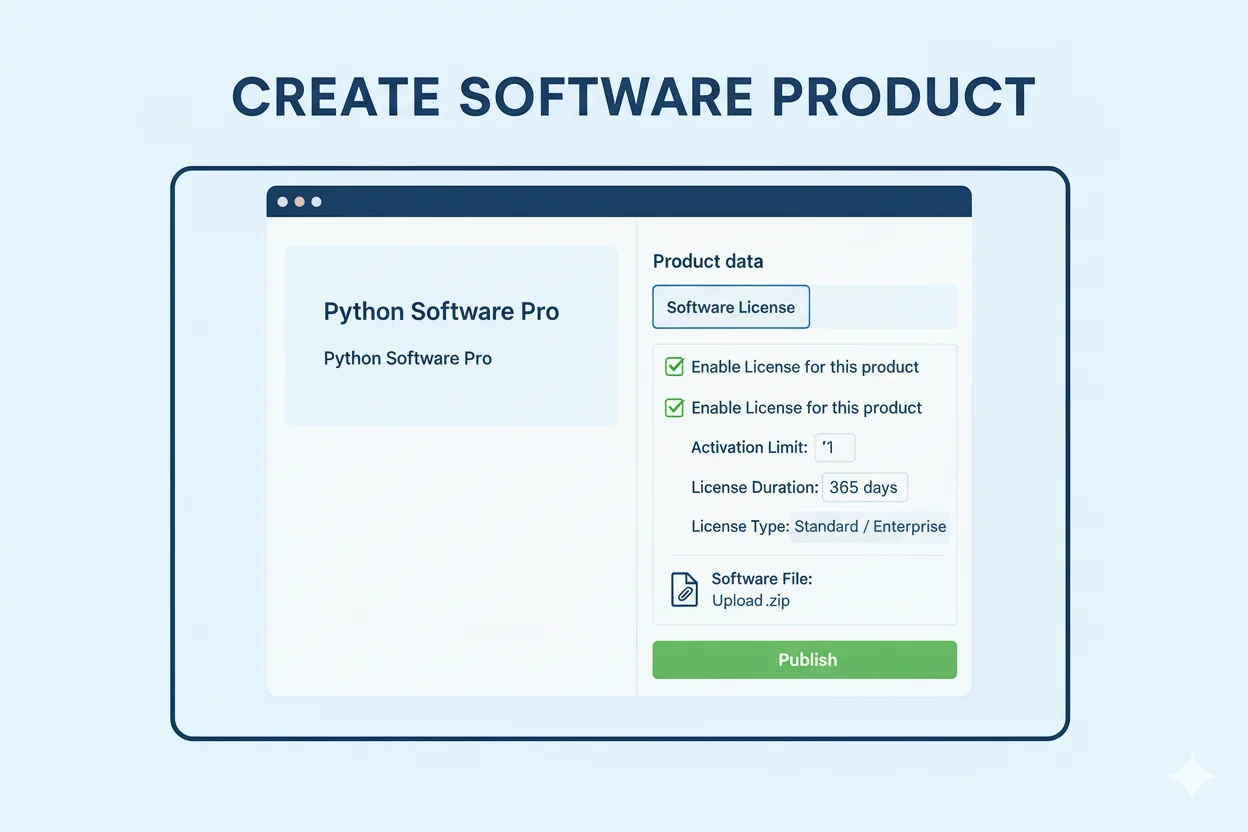
🛍️ Tạo Sản Phẩm Phần Mềm
Bước 1: Tạo Product trong WooCommerce
- Products → Add New
- Nhập tên: “Python Software Pro”
- Product Type: Simple Product hoặc Variable Product
Bước 2: Enable License Settings
Kéo xuống tab Software License, tick:
✅ Enable License for this product
Activation Limit: 1 (số máy có thể kích hoạt)
License Duration: 365 days (0 = lifetime)
License Type: Standard / Pro / Enterprise
Bước 3: Upload File hoặc Link Download
Software File: [Upload .zip] hoặc nhập URL
Software Version: 1.0.0
Release Notes: (optional)
Bước 4: Publish Product
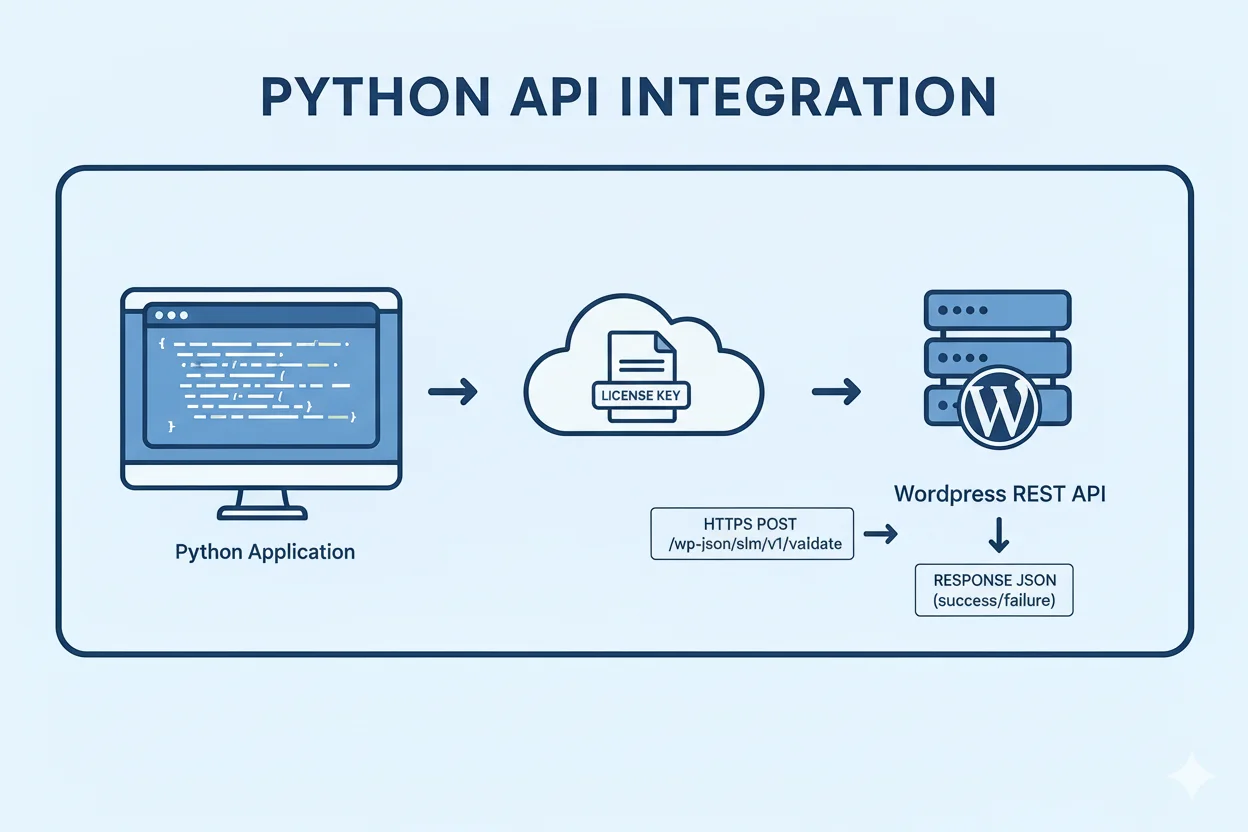
🐍 Tích Hợp API cho Python App
Code Python – Validate License
import requests
import hashlib
import platform

class LicenseManager:
    def __init__(self, api_url, license_key):
        self.api_url = api_url
        self.license_key = license_key
        self.machine_id = self.get_machine_id()

    def get_machine_id(self):
        # Tạo machine ID unique
        machine_name = platform.node()
        mac_address = ':'.join(['{:02x}'.format((int(x, 16)))
                               for x in platform.node().split('-')])
        unique_string = f"{machine_name}-{mac_address}"
        return hashlib.sha256(unique_string.encode()).hexdigest()

    def validate(self):
        endpoint = f"{self.api_url}/validate"
        data = {
            'license_key': self.license_key,
            'machine_id': self.machine_id
        }

        response = requests.post(endpoint, json=data)
        return response.json()

    def activate(self):
        endpoint = f"{self.api_url}/activate"
        data = {
            'license_key': self.license_key,
            'machine_id': self.machine_id,
            'machine_name': platform.node()
        }

        response = requests.post(endpoint, json=data)
        return response.json()

# Sử dụng
license = LicenseManager(
    api_url='https://yoursite.com/wp-json/slm/v1',
    license_key='XXXX-XXXX-XXXX-XXXX-XXXX'
)

# Validate
result = license.validate()
if result['success']:
    print("License hợp lệ!")
else:
    print(f"Lỗi: {result['message']}")
📧 Tùy Chỉnh Email Template
Tạo file: templates/emails/license-key.php
<!DOCTYPE html>
<html>
<head>
    <meta charset="UTF-8">
    <style>
        body { font-family: Arial, sans-serif; line-height: 1.6; }
        .container { max-width: 600px; margin: 0 auto; padding: 20px; }
        .header { background: #0073aa; color: white; padding: 20px; text-align: center; }
        .content { padding: 30px; background: #f9f9f9; }
        .license-box { background: white; padding: 15px; border-left: 4px solid #0073aa; margin: 20px 0; }
        code { background: #f0f0f0; padding: 5px 10px; font-size: 14px; }
    </style>
</head>
<body>
    <div class="container">
        <div class="header">
            <h1><?php echo get_bloginfo('name'); ?></h1>
            <p>Cảm ơn bạn đã mua hàng!</p>
        </div>

        <div class="content">
            <p>Xin chào <strong><?php echo esc_html($order->get_billing_first_name()); ?></strong>,</p>

            <p>License key(s) cho đơn hàng <strong>#<?php echo $order->get_order_number(); ?></strong>:</p>

            <?php foreach ($licenses as $license):
                $product = wc_get_product($license->product_id);
            ?>
            <div class="license-box">
                <h3><?php echo esc_html($product->get_name()); ?></h3>
                <p><strong>License Key:</strong></p>
                <code><?php echo esc_html($license->license_key); ?></code>

                <?php if ($license->expires_at): ?>
                <p><strong>Hết hạn:</strong> <?php echo date_i18n('d/m/Y', strtotime($license->expires_at)); ?></p>
                <?php endif; ?>
            </div>
            <?php endforeach; ?>

            <h3>Hướng dẫn sử dụng:</h3>
            <ol>
                <li>Tải phần mềm từ trang đơn hàng</li>
                <li>Cài đặt và chạy phần mềm</li>
                <li>Nhập license key khi được yêu cầu</li>
                <li>Bắt đầu sử dụng!</li>
            </ol>
        </div>
    </div>
</body>
</html>
✅ Checklist Hoàn Thành
- [ ] Upload tất cả files plugin
- [ ] Kích hoạt plugin trong WordPress
- [ ] Kiểm tra database tables đã tạo
- [ ] Cấu hình settings
- [ ] Tạo sản phẩm test
- [ ] Test mua hàng và nhận license
- [ ] Test API với Python
- [ ] Tùy chỉnh email template
- [ ] Test trên môi trường staging trước khi deploy production
🆘 Troubleshooting
License không tự động sinh sau khi order completed
- Kiểm tra WooCommerce order status
- Đảm bảo product đã enable license setting
- Check WordPress debug log:
wp-content/debug.log
Email không gửi
- Kiểm tra SMTP settings của WordPress
- Test với plugin WP Mail SMTP
- Verify “Enable Email” trong settings
API trả về 404
- Flush rewrite rules: Settings → Permalinks → Save
- Kiểm tra
.htaccesscó quyền write - Verify REST API hoạt động:
/wp-json/
🎉 Hoàn thành! Plugin đã sẵn sàng sử dụng.
📦 Tóm Tắt Các File Đã Tạo
Plugin Core Files
software-license-manager/
├── software-license-manager.php (Main plugin file)
├── includes/
│   ├── class-slm-database.php (Quản lý database)
│   ├── class-slm-license.php (Logic license)
│   ├── class-slm-generator.php (Sinh license key)
│   ├── class-slm-email.php (Gửi email)
│   ├── class-slm-woocommerce.php (Tích hợp WooCommerce)
│   └── class-slm-api.php (REST API)
├── admin/
│   ├── class-slm-admin.php (Admin interface)
│   ├── class-slm-product-settings.php (Product settings tab)
│   └── class-slm-license-list.php (License list table)
├── frontend/
│   └── class-slm-my-account.php (My Account tab)
└── assets/
    ├── css/
    │   ├── admin.css
    │   └── frontend.css
    └── js/
        ├── admin.js
        └── frontend.js
Python Integration
license_client.py (Python client để tích hợp vào phần mềm)
🚀 Quick Start Guide
1️⃣ Cài Đặt Plugin (5 phút)
# Upload tất cả files vào thư mục plugin
cd /wp-content/plugins/
mkdir software-license-manager
# Copy all files vào đây

# Kích hoạt plugin trong WordPress Admin
2️⃣ Cấu Hình Cơ Bản (3 phút)
- Vào Software Licensing → Settings
- Enable License System: ✅
- Enable Email: ✅
- Lưu settings
3️⃣ Tạo Sản Phẩm (5 phút)
- Products → Add New
- Điền thông tin sản phẩm
- Tab Software License: Enable ✅
- Upload file hoặc link download
- Publish
4️⃣ Test Mua Hàng (2 phút)
- Mua sản phẩm test
- Kiểm tra email nhận license key
- Vào My Account → My Licenses
5️⃣ Tích Hợp Python (10 phút)
- Copy file
license_client.py - Update
api_urltrong code - Chạy test:
python license_client.py
✅ XONG! Plugin hoạt động đầy đủ.
🎯 Tính Năng Chính
✅ Tự động cấp phát license khi order completed
✅ Gửi email tự động với license key
✅ Quản lý activation (giới hạn số máy)
✅ REST API cho Python app
✅ My Account tab cho khách hàng
✅ Dashboard thống kê trực quan
✅ Kiểm tra hết hạn tự động
✅ Hỗ trợ update phần mềm
💡 Tips & Best Practices
Security
- Luôn dùng HTTPS cho API
- Thêm rate limiting nếu cần
- Backup database thường xuyên
Performance
- Cài đặt caching plugin (W3 Total Cache, WP Rocket)
- Optimize database định kỳ
- Monitor API response time
User Experience
- Tùy chỉnh email template cho brand
- Thêm hướng dẫn chi tiết trong email
- Support team phản hồi nhanh
🔧 Customization
Thay đổi License Key Format
File: includes/class-slm-generator.php
// Thay đổi format (mặc định: XXXX-XXXX-XXXX-XXXX-XXXX)
$format = 'XXX-XXX-XXX'; // Format ngắn hơn
Thêm Webhook khi License Created
File: includes/class-slm-license.php
do_action('slm_license_created', $license_id, $license_key, $order_id);

// Hook vào action này
add_action('slm_license_created', function($license_id, $key, $order_id) {
    // Gửi webhook đến hệ thống khác
    wp_remote_post('https://your-webhook-url.com', array(
        'body' => json_encode(array(
            'license_id' => $license_id,
            'license_key' => $key
        ))
    ));
});
Custom Email Template
Tạo file: wp-content/themes/your-theme/woocommerce/emails/license-key.php
📞 Support & Documentation
- GitHub: [Link repository]
- Documentation: [Link docs]
- Support Email: support@yoursite.com
- Video Tutorial: [Link YouTube]
🎓 Advanced Features (Nâng Cao)
1. Subscription License (Gia hạn tự động)
Tích hợp với WooCommerce Subscriptions để gia hạn license tự động.
2. Domain/IP Locking
Giới hạn license theo domain hoặc IP address.
3. Analytics Dashboard
Thống kê chi tiết: số lượng activation, location, device…
4. White-Label
Cho phép reseller đổi branding email và portal.
5. Multi-Language
Hỗ trợ đa ngôn ngữ với WPML hoặc Polylang.
🐛 Known Issues & Solutions
Issue: License không tự động sinh
Solution: Kiểm tra WooCommerce order status hook
Issue: Email không gửi
Solution: Test với WP Mail SMTP plugin
Issue: API trả về 404
Solution: Flush rewrite rules ở Settings → Permalinks
🔄 Migration & Backup
Backup License Data
-- Export licenses table
mysqldump -u username -p database_name wp_software_licenses > licenses_backup.sql

-- Export activations table
mysqldump -u username -p database_name wp_software_license_activations > activations_backup.sql
Import to New Site
mysql -u username -p new_database_name < licenses_backup.sql
mysql -u username -p new_database_name < activations_backup.sql
📊 Monitoring & Analytics
Check Plugin Status
// Add to functions.php for monitoring
add_action('admin_init', function() {
    $stats = SLM_Database::get_stats();

    // Send to monitoring service
    if ($stats['expiring_soon'] > 10) {
        // Alert: Many licenses expiring soon!
        wp_mail('admin@site.com', 'License Alert', 'Check expiring licenses');
    }
});
API Health Check
# Test API endpoints
curl -X POST https://yoursite.com/wp-json/slm/v1/validate \
  -H "Content-Type: application/json" \
  -d '{"license_key":"TEST-KEY-1234","machine_id":"test"}'
🎉 Final Checklist
- [x] Plugin uploaded và activated
- [x] Database tables created
- [x] Settings configured
- [x] Test product created
- [x] Test order completed
- [x] Email received với license key
- [x] My Account tab hiển thị
- [x] Python client tested
- [x] API endpoints working
- [x] SSL certificate installed
- [x] Backup configured
🚀 Your License Manager is Ready for Production!